We have listed the most frequently asked questions from Opus camera owners and those wishing to find out more about how our cameras can advance their research. We hope you find what you are looking for. If you have a specific question that is not answered below, please get in touch via the enquiries tab.

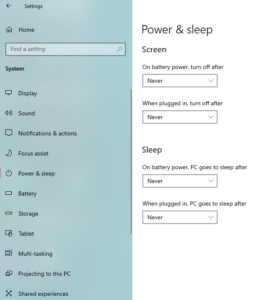
If you are having difficulty connecting your Osiris camera, we recommend using these settings.
Please set all the power and sleep options to ‘never’
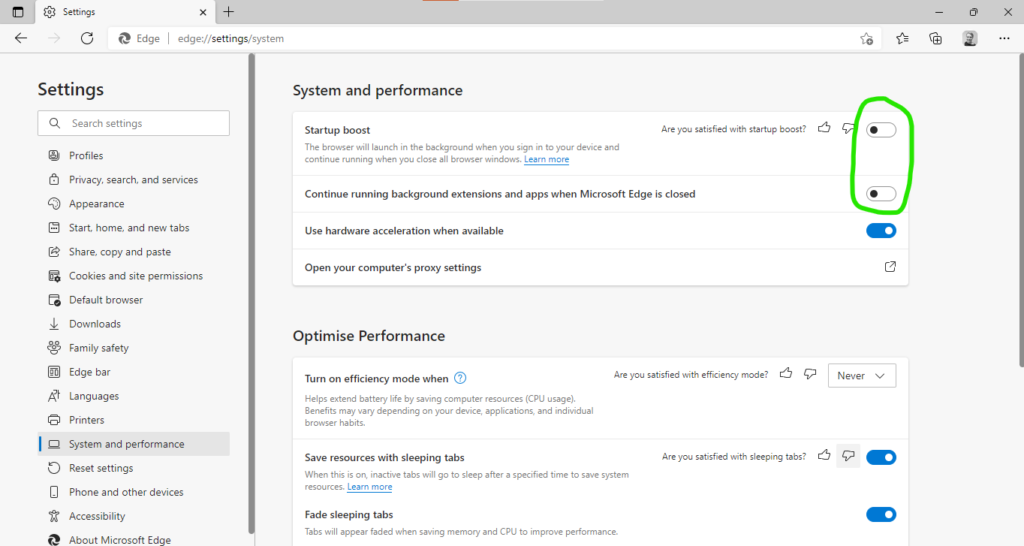
Osiris software producing configuration error on startup.
This problem relates to Microsoft Edge settings in Windows 10. Thanks to valuable user feedback, we believe that we have identified the cause of the Osiris software reporting the error message: ‘This Software is not configured for the connected camera’. To resolve this issue, please modify the ‘System Performance’ settings in Edge as shown. Then, power cycle your Osiris camera.
You may also need to restart your computer
How do I clean the lenses of my Opus camera?
Over time, dust, fingerprints, and other debris will accumulate on your camera’s optical elements, affecting imaging results.
These should be cleaned periodically as needed.
Identifying the optical elements
-Black Filter – pre-installed on the lens (removable)
-Lens glasses – front and rear
-Dust Window – fitted on camera case/bellow (cannot be removed)
Useful items
-A fine microfiber cloth and/or lens pen
-Can of compressed air
-Specialty optical cleaning fluid*
General application
Please note: It is strongly advised to handle cleaning items very gently, using soft pressure to preserve the coating properties on the windows/lens!
Begin by applying compressed air thoroughly to all glass surfaces. This should remove any loose dust particles and debris – especially metallic particles that may accumulate from repeated unscrewing of the lens/filters.
Next, a clean microfiber cloth can be used in circular, gentle movements to remove any remaining softer debris, marks, and fingerprints. Using a dedicated lens pen is another option, especially on the lens’s glasses for a more precise finish.
For any remaining marks that could not be removed by gentle cleaning, we suggest applying a small amount of optical cleaning fluid, then repeating the microfiber cloth process. Do not use isopropanol or any other solvents that might damage the coating.
*Opus Instruments recommends Optical Wonder™ Cleaning Fluid by Baader Planetarium as an adequate, tested cleaning fluid designed for sensitive optical surfaces.
I am migrating to a new computer. How do I install the latest version of the software?
If you are migrating to a new computer, you must install the original software supplied with your camera first. This is because it contains the necessary calibration files that are unique to your camera. The upgrade file is generic, it does not contain these calibrations.
This is the recommended procedure:
· Install the original software that was supplied with your camera on CD or USB stick
· Connect your camera and switch it on
· Take an example random image – this procedure will create any necessary setup files
· Close the Apollo software and disconnect your camera
· Please restart your computer
Can I purchase a second-hand/refurbished camera?
Yes, we often have refurbished Osiris cameras for sale at a significantly discounted price. Please enquire via the general enquiries form at the bottom of this page for more information. We welcome your enquiry.
The software is running slowly and at times intermittently. What could be the cause of this?
Issues such as software freezing or appearing unresponsive could be due to tasks running in the background. In particular, Windows updates. We recommend going to the system settings and manually checking for updates.
Additionally, the latest version of the Apollo software can be found here:
https://www.opusinstruments.com/wp-content/uploads/2020/02/Apollo-Setup-1.0.0.25.zip
Uninstall the old version, and then you can proceed with the installation of the newest software version.
I would like to use a longer USB cable than the one that was originally supplied with the camera. Is this possible?
Generally speaking, the most reliable connection will be achieved with a USB cable of 3 metres or less. However, should you need to use a longer cable, we would recommend that you also use a powered USB hub to buffer the connection.
I have lost the original installation CD for my Osiris camera; can I get a replacement?
Please note that Osiris is a discontinued product. While we continue to offer support, certain limitations may apply. For assistance, please contact us via email or the web form, and include the camera’s serial number and year of acquisition.
Can I run my Apollo / Osiris software on Windows 11?
Yes. The Osiris and the Apollo software are compatible with Windows 11. Please keep in mind the recommendations from the previous versions for optimal operation of the camera.
We have an Osiris camera that has previously been used with an old version of Windows TM, and we would now like to use the camera on a computer running Windows 10. Can you supply a compatible version of the camera software?
This will depend on the age of the camera, which we can determine from its serial number. Unfortunately, some very old Osiris cameras may not compatible without upgrading the camera’s electronics.
I have some unusual lines or features that have started to appear in the image. Is there a problem with my camera?
This is unlikely, as most image artifacts are simply caused by the accumulation of dust on one of the optical surfaces. In many cases the user will be able to address the issue themselves. It is recommended that you unscrew the camera lens from the camera body to reveal the external glass window. Then, using a can of compressed air, please gently remove any dust particles from this window. This will usually resolve the issue. However, if the problem still persists, please seek advice from our service department.
What are the minimum requirements for the Apollo software?
The recommended minimums are:
Windows 10
Intel i5 9th generation or newer
8GB RAM
A solid-state hard drive is highly recommended
Can I have a demonstration of the Apollo camera at my premises?
Yes, we are always happy to travel from Portugal to demonstrate Opus cameras and discuss your requirements. Please contact the sales team or submit a request via our web form at the footer of the website.
Do you offer camera maintenance plans?
Yes, we offer maintenance plans. The plan starts when the 3-year warranty period ends and is available for new cameras only. If you would like to discuss this option in further detail, please get in touch and we will be happy to help.
Opus Instruments’ IRR cameras are trusted by leading galleries, paintings conservation studios, auction houses and educational establishments worldwide in the analysis of the underdrawing, pentimenti and pigments of fine art. The resulting infrared reflectograms provide valuable information about the processes and methods an artist employed, the condition of the canvas and may uncover hidden secrets, only seen by the artist themselves.
If you would like to find out more about Opus cameras, click on the link below
Products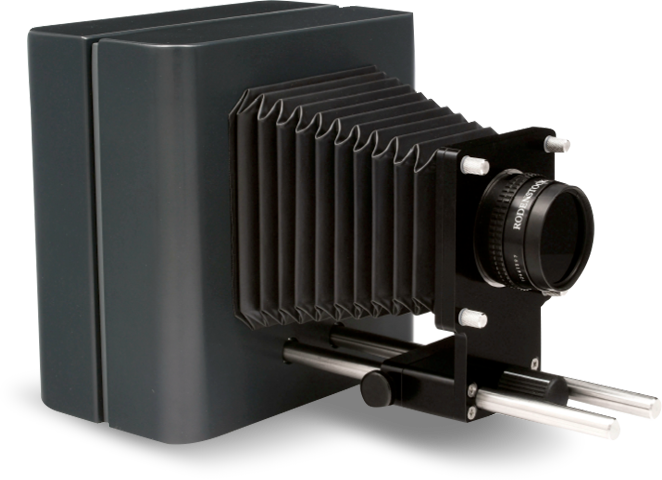
The Osiris Camera has been indispensable for the past ten years